Self-Hosting
Deploy preroll.io on your own infrastructure with full feature access and no plan restrictions.
Overview
Setting PREROLL_SELF_HOSTED=true bypasses all plan checks. You get unlimited clients, shows, episodes, integrations, webhooks, API keys, multi-user support, and white-label branding — no Stripe subscription required.
A default organization is auto-created on first signup, so the first user becomes the owner immediately.
What You Need
| Requirement | Details |
|---|---|
| Supabase | Postgres database with Auth, RLS, and Realtime |
| Cloudflare R2 | S3-compatible object storage for assets |
| Node.js host | Node.js 18+ runtime (Docker, Vercel, or bare metal) |
| SMTP | Email provider for magic link authentication |
What's NOT Needed
| Component | Why |
|---|---|
| Stripe API keys | Plan checks are bypassed — no billing required |
| Resend API key | Use any SMTP provider instead |
| License key | Self-hosted mode is a soft gate with contact capture |
Step 1: Clone the Repo
git clone https://github.com/tro2789/preroll.io.git
cd preroll.io
Step 2: Set Up Supabase
Option A: Self-Hosted (Docker)
git clone https://github.com/supabase/supabase
cd supabase/docker
cp .env.example .env
# Edit .env with your secrets
docker compose up -d
Option B: Supabase Cloud
Create a project at supabase.com. Note your project URL and service role key from the API settings page.
Step 3: Run Migrations
Install the Supabase CLI and apply all migrations:
npm install -g supabase

# Link to your project (cloud) or local instance
supabase link --project-ref your_project_id

# Apply all migrations
supabase db push
Step 4: Configure Environment
Create a .env.local file with the following variables:
# Core
PREROLL_SELF_HOSTED=true
NEXT_PUBLIC_SITE_URL=https://your-domain.com

# Supabase
NEXT_PUBLIC_SUPABASE_URL=https://your-project.supabase.co
NEXT_PUBLIC_SUPABASE_ANON_KEY=your_anon_key
SUPABASE_SERVICE_ROLE_KEY=your_service_role_key

# Cloudflare R2
R2_ACCOUNT_ID=your_account_id
R2_ACCESS_KEY_ID=your_access_key
R2_SECRET_ACCESS_KEY=your_secret_key
R2_BUCKET_NAME=preroll-assets
R2_PUBLIC_URL=https://assets.your-domain.com

# Email (SMTP for magic links)
SMTP_HOST=smtp.your-provider.com
SMTP_PORT=587
SMTP_USER=your_smtp_user
SMTP_PASS=your_smtp_password
SMTP_FROM=noreply@your-domain.com

# AI Features (optional — bring your own keys)
DEEPGRAM_API_KEY=your_deepgram_key
ANTHROPIC_API_KEY=your_anthropic_key

# OAuth Integrations (optional — only needed if you use these)
FRAMEIO_CLIENT_ID=your_client_id
FRAMEIO_CLIENT_SECRET=your_client_secret
GOOGLE_CLIENT_ID=your_client_id
GOOGLE_CLIENT_SECRET=your_client_secret
VIMEO_CLIENT_ID=your_client_id
VIMEO_CLIENT_SECRET=your_client_secret
AI features (transcription and content generation) require API keys from Deepgram and Anthropic. In self-hosted mode, you can also configure these per-organization in Settings > AI using the bring-your-own-key option — no credits needed.
Step 5: Deploy
Docker
docker build -t preroll .
docker run -p 3000:3000 --env-file .env.local preroll
Vercel
vercel deploy --prodSet all environment variables in the Vercel dashboard under Settings → Environment Variables.
Node.js
npm install
npm run build
npm start
Step 6: Register OAuth Apps
If you plan to use integrations, register OAuth applications with each provider:
| Provider | Console | Callback Path |
|---|---|---|
| Frame.io | Adobe Developer Console | /api/integrations/frameio/callback |
| Google Drive | Google Cloud Console | /api/integrations/google-drive/callback |
| Vimeo | Vimeo Developer | /api/integrations/vimeo/callback |
| YouTube | Google Cloud Console | /api/integrations/youtube/callback |
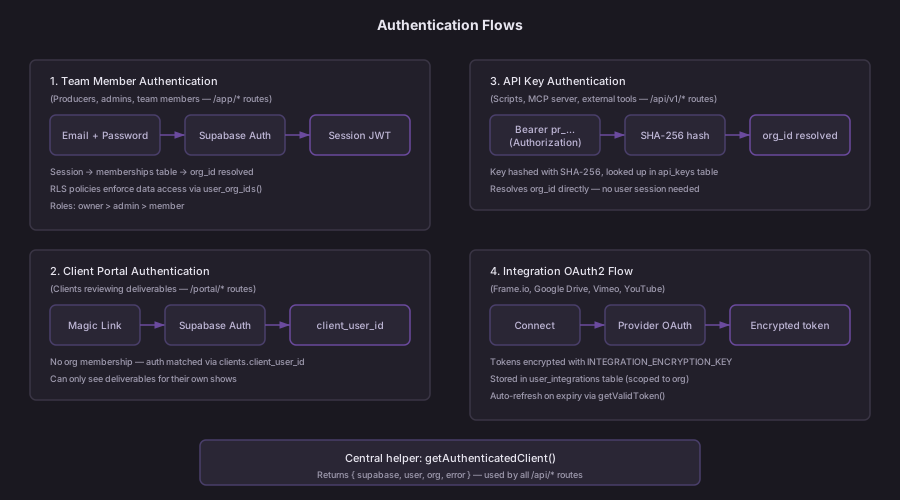
Step 7: Configure Auth
Supabase Auth handles user authentication. Configure SMTP in your Supabase dashboard (or Docker .env) so magic link emails can be sent:
- Go to Authentication → Email Templates in your Supabase dashboard
- Configure the SMTP settings under Authentication → SMTP Settings
- Customize the magic link email template with your branding
Step 8: Email Notifications (Optional)
preroll.io can send email notifications for deliverable approvals, revision requests, and other events. Configure these SMTP variables:
| Variable | Description |
|---|---|
SMTP_HOST | SMTP server hostname |
SMTP_PORT | SMTP port (typically 587 for TLS) |
SMTP_USER | SMTP authentication username |
SMTP_PASS | SMTP authentication password |
SMTP_FROM | Sender email address |
If SMTP is not configured, email notifications are silently skipped.
System Requirements
| Resource | Minimum | Recommended |
|---|---|---|
| RAM | 512 MB | 1 GB |
| CPU | 1 vCPU | 2 vCPU |
| Disk | 1 GB | 5 GB |
| Node.js | 18.x | 20.x+ |
Updating
Pull the latest changes and re-deploy:
git pull origin main
npm install
supabase db push   # Apply any new migrations
npm run build
npm start
For Docker deployments, rebuild the image:
docker build -t preroll .
docker compose up -d