Core Concepts
Understand preroll.io's data model — organizations, clients, shows, episodes, and how they connect.
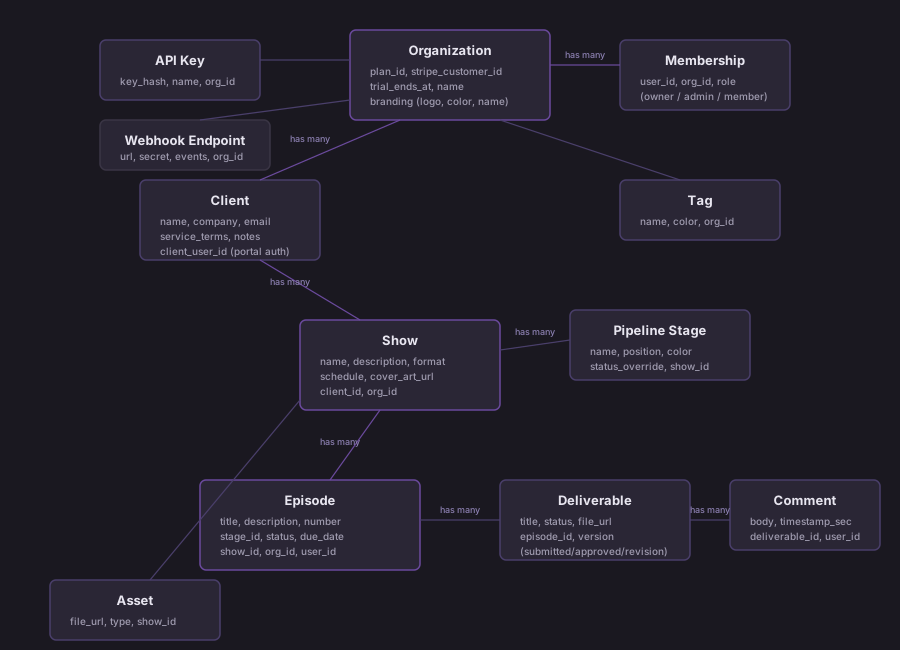
preroll.io's data model is hierarchical: everything lives inside an organization, and data flows down from clients to shows to episodes. Understanding this structure helps you work effectively with the platform and its API.
System Architecture
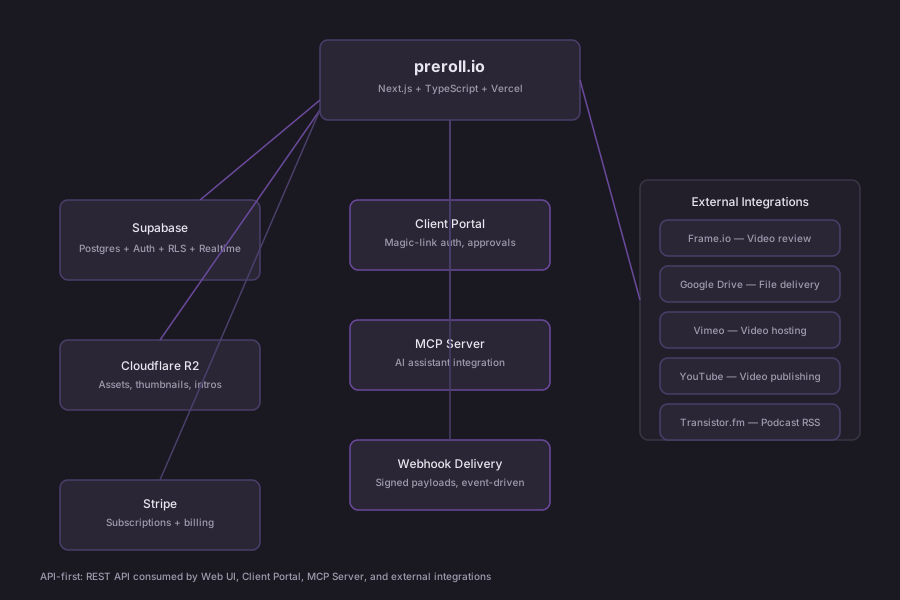
preroll.io is API-first. The REST API is the product — the web UI, client portal, and MCP server are all consumers of the same API. Integrations (Frame.io, Transistor, Castopod, Google Drive, Vimeo, YouTube) connect via OAuth, API keys, or HTTP Basic Auth and are orchestrated through preroll.io rather than replaced by it.
Data Model
Organizations
An organization is the top-level workspace in preroll.io. All data — clients, shows, episodes, assets, integrations, API keys — belongs to an organization.
- Solo producers have a single-person org created automatically at signup
- Agencies can invite multiple team members to the same org
- Each org has its own billing plan (Free, Pro, or Studio)
- The
org_idfield scopes everything in the database
preroll.io is multi-tenant at the organization level, not the user level. Users access data through their org membership, not directly.
Users and Memberships
Users join organizations through memberships. Each membership has a role:
| Role | Permissions |
|---|---|
| Owner | Full access, billing management, can delete org |
| Admin | Full access, can manage team members |
| Member | Can manage clients, shows, and episodes |
A user can belong to multiple organizations (useful for freelancers working with multiple agencies), but each session operates within a single org context.
Clients
A client represents a person or company you produce podcasts for. Clients are the first level of organization below your workspace.
Key fields:
- Name, email, company
- Contact information and notes
- Service terms (scope, pricing, deliverables frequency)
- Meeting notes (timestamped, markdown-supported)
Relationships:
- Belongs to one organization
- Has many shows
- Can have a portal login (
client_user_id) for the client portal
Shows
A show is an individual podcast series belonging to a client. This is where production configuration lives.
Key fields:
- Title, description, format (interview, solo, narrative, etc.)
- Schedule (weekly, biweekly, monthly, etc.)
- Branding (cover art, accent colors)
- Distribution connection (Transistor.fm show ID)
- Episode template (default description, notes auto-applied to new episodes)
Relationships:
- Belongs to one client
- Has many episodes
- Has many assets (show-level: cover art, intros, outros, music beds)
- Has a customizable pipeline (ordered list of stages)
Episodes
An episode is the core unit of work in preroll.io. Each episode represents a single installment of a show and moves through the show's pipeline stages from creation to publication.
Key fields:
- Title, number, description/show notes
- Current pipeline stage
- Due date
- Tags (for filtering and organization)
- Status (derived from pipeline stage)
Relationships:
- Belongs to one show
- Has many deliverables (files for client approval)
- Has many assets (episode-specific: thumbnails, clips, documents)
- Has many file references (links to external files)
- Has integration connections (Frame.io project, Google Drive folder, Vimeo video)
- Has review comments (timecoded, optionally synced to Frame.io)
Pipeline Stages
Each show has a customizable pipeline — an ordered list of stages that episodes move through. Stages represent your production workflow.
Default pipeline:
Planning → Recording → Editing → Review → Approved → PublishedCustomization:
- Add, remove, or reorder stages per show
- Each stage has a name and position
- Stages can map to a
status_overridethat sets the episode's top-level status - The kanban board columns correspond directly to pipeline stages
Example custom pipelines:
For a narrative podcast:
Research → Scripting → Recording → Sound Design → Mix → Review → PublishedFor a simple interview show:
Scheduled → Recorded → Edited → Approved → PublishedDeliverables
A deliverable is a piece of content sent to a client for review and approval. Deliverables power the approval workflow in preroll.io.
Lifecycle:
Created → Sent for Review → Approved / Changes Requested → Revised → ApprovedKey fields:
- Title, description
- Attached file (audio, video, document)
- Status (draft, pending review, approved, changes requested)
- Client feedback (comments, timecoded notes)
Where they appear:
- Episode detail page (producer side)
- Client portal (client side, for review and approval)
Assets
Assets are media files stored in preroll.io's cloud storage (Cloudflare R2). They exist at two levels:
| Level | Examples |
|---|---|
| Show assets | Cover art, intro audio, outro audio, music beds |
| Episode assets | Thumbnails, audiograms, social clips, show notes PDFs |
Assets are for lightweight, reusable media. Large production files (raw recordings, video masters) should be stored externally and linked via file references or integrations.
Tags
Tags are labels you can apply to episodes for organization and filtering.
- Tags are scoped to your organization (shared across all shows)
- Apply multiple tags per episode
- Filter the kanban board, calendar, and lists by tag
- Useful for categorizing by topic, season, priority, or workflow state
Templates
Episode templates are configured per show. When you create a new episode, the template auto-populates fields like:
- Default description or show notes structure
- Default tags
- Notes or instructions for the production team
Templates save time when your episodes follow a consistent format.
Integrations
preroll.io connects to external services to extend your workflow without replacing your existing tools.
| Integration | Purpose | Connection Type |
|---|---|---|
| Frame.io | Video review and approval | OAuth (Adobe IMS) |
| Google Drive | File delivery and storage | OAuth2 |
| Vimeo | Video delivery to clients | OAuth2 |
| YouTube | Video distribution | OAuth2 |
| Transistor.fm | Podcast publishing/distribution | API key per show |
| Webhooks | Custom automation (n8n, Zapier, etc.) | HTTP endpoints |
| MCP Server | AI assistant interaction | Local CLI |
Integrations are configured at the organization level and used at the episode level. For example, you connect your Frame.io account once, then link individual episodes to Frame.io projects for review.
How It All Connects
Here's how the hierarchy works in practice:
Organization (your workspace)
├── Team Members (via memberships)
├── Tags (shared across all shows)
├── Integrations (Frame.io, Google Drive, etc.)
├── API Keys (for external access)
├── Webhook Endpoints (for automation)
└── Clients
    ├── Client Profile (contact, notes, terms)
    └── Shows
        ├── Show Settings (format, schedule, branding)
        ├── Pipeline Stages (customizable workflow)
        ├── Episode Template
        ├── Show Assets (cover art, intros, outros)
        ├── Distribution (Transistor.fm connection)
        └── Episodes
            ├── Pipeline Position (current stage)
            ├── Deliverables (for client approval)
            ├── Episode Assets (thumbnails, clips)
            ├── File References (external links)
            ├── Integration Links (Frame.io, Drive, Vimeo)
            ├── Review Comments (timecoded)
            └── Tags
Two Auth Paths
preroll.io has distinct authentication for producers and clients:
| Path | Who | How | Access |
|---|---|---|---|
| Producer auth | You and your team | Magic link or Google OAuth | Full app (/app/*) |
| Client auth | Your clients | Magic link only | Client portal (/portal/*) |
| API auth | Scripts and tools | API key (Bearer token, pr_ prefix) | REST API |
Clients never see the producer interface. They only access their own portal with their own shows and deliverables.